Summary
Accessibility issues often appear quietly: After a plugin update, a new comment, or a small content change no one notices. Manual audits catch the big, complex problems, but automated monitoring tools help spot the everyday issues that slip through. In this example, a simple reader comment created an invisible empty link that would confuse anyone using assistive technology. Tools can catch these hidden problems quickly, while people and processes ensure they get fixed. Strong accessibility comes from combining all three: human judgment, consistent workflows, and continuous automated monitoring to keep websites usable, accessible, and trustworthy.
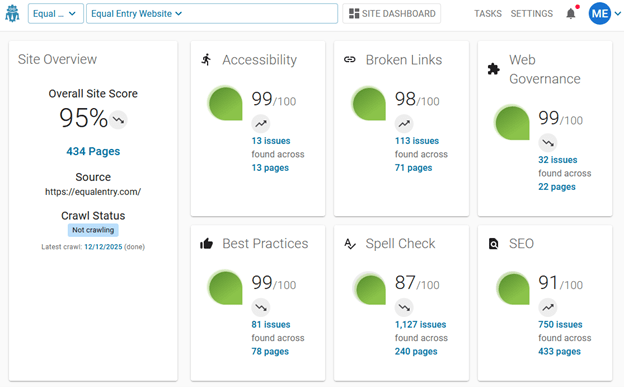
Accessibility breaks most often in the quiet moments: After a plugin update, after a new comment, after a well‑intentioned content edit that introduces something no one notices. It’s essential to make accessibility part of ensuring a website’s quality. Hence, a site monitoring tool should be one of the tools in a company’s website toolbox.
Website teams rely on automated monitoring tools every day to track broken links, SEO performance, and content quality. Accessibility belongs in the same category as critical site‑quality checks. While manual audits remain the primary solution for identifying complex barriers, automated monitoring plays a key role in detecting issues that appear between those deeper reviews.
At Equal Entry, our standard consulting process recommends comprehensive manual audits twice a year. That level of rigor matters especially because websites are living systems. New content, content management system (CMS) upgrades, plugin updates, and user‑generated comments can introduce accessibility issues at any time, even on sites with mature accessibility practices.
We hold ourselves to the same expectations we set for clients. Our six‑step accessibility auditing process is thorough. The remediation of issues identified in the audit means the site has addressed critical accessibility issues. However, organizations need a way to continuously check the site to account for the new content being added through dynamic site updates.
That’s where automation strengthens the process. To bridge the gap between manual audits, we use DubBot to monitor our site continuously. When paired with expert manual reviews, they help ensure accessibility remains a core part of overall site quality.
DubBot spots a problem
One day, DubBot surfaced an issue we wouldn’t have caught through manual reviews alone. A reader left a perfectly standard comment: “Thank you, you wrote a great article.” Sighted users saw only that sentence. But behind the scenes, the comment included an empty link.
DubBot flagged it because the link had no accessible name. A screen reader would announce it simply as “link,” offering no context and no purpose. That’s confusing for users and a clear accessibility failure.

Here’s what appeared on the page.
Thank you, you wrote a great article.What the HTML showed.
Thank you, you wrote a great article.

<a href=“https://spam-website..com/” rel=“nofollow ugc”></a>
WCAG failures
This single comment caused the page to fail two WCAG 2.2 success criteria:
- 2.4.4: Link purpose (in context)
- 4.1.2: Name, role, value
WCAG 2.4.4 Link purpose (In context)
WCAG SC 2.4.4 requires that every link include descriptive text so users understand where it leads. An empty link is like a door with no sign. You can see the door but you have no idea what’s on the other side.
On a website, that uncertainty becomes a barrier. Users relying on assistive technologies need clear, descriptive link text to navigate confidently.
WCAG 4.1.2 Name, role, value
WCAG 4.1.2 requires that every user interface component contain a programmatically determinable:
- Name: What the element is called (its label).
- Role: What type of element it is (link, button, checkbox).
- Value: Its current state (on/off, checked/unchecked).
A simple way to think about this is a remote control:
- The button labeled “Play” is the name.
- Starting the video is the role.
- Whether the video is currently playing or paused is the value.
Interactive elements on a website, like links and buttons, need the same clarity. An empty link is like a mystery button with no label. You can press it, but you have no idea what it does. Without a name or purpose (role), assistive technologies can’t communicate it to users. This creates an inaccessible experience.
Why these accessibility guidelines matter
When a link has no accessible name, assistive technology users hear only “blank” or “link with no context.” Keyboard users may tab to something that appears invisible. And vague link text like “click here” doesn’t help anyone. No one knows where it leads.
It’s the digital equivalent of walking through a hallway and finding a door labeled “open me.” You might end up in a library, a gym, or the wrong meeting room entirely. Clear labels, such as “library,” “gym,” “meeting room,” give people the information they need before they take action. Links work the same way.
The role of automation in accessibility
Automated tools like DubBot don’t replace manual audits, but they play a critical role in continuous monitoring. Websites change constantly, and automation helps surface hidden issues the moment they appear, keeping sites more resilient between scheduled reviews. When used thoughtfully, automation becomes an essential part of a mature accessibility strategy.
Automated tools aren’t perfect, as you can learn from our comparison of automated testing tools for digital accessibility. While they can miss issues or flag false positives, they provide an additional layer of protection.
Accessibility isn’t about checking boxes. It’s about ensuring every user can navigate with confidence. Empty links, vague labels, and unnoticed errors erode that experience. By pairing expert manual audits with automated monitoring, organizations can stay ahead of problems and maintain a consistently usable site for everyone.
“Some of our most successful customers start with a manual accessibility audit, then use DubBot to continuously monitor their sites to help stay in compliance,” says Blaine Herman, Founder of DubBot.
Why people, processes, and technology all matter
Automation can surface problems, but detection alone doesn’t improve accessibility. Many monitoring tools stop at scanning and reporting, leaving teams with a growing list of issues and no clear path to resolution. A mature accessibility practice needs more than alerts. It needs a system that connects the right people to the right problems at the right time.
That’s where DubBot’s workflow design stands out. Instead of generating static reports, DubBot makes it possible to assign each issue to a specific person who can investigate, verify, and close it. That accountability loop turns automated findings into actionable work. It ensures that problems don’t linger in dashboards or spreadsheets. They move through a process until they’re resolved.
This combination of people, processes, and technology is what keeps accessibility sustainable. Automation catches the unexpected. Processes ensure issues are tracked and managed. People bring the judgment and expertise to fix what the tools uncover. Together, they create a system that doesn’t just identify accessibility barriers. It removes them.
The takeaway: Accessibility is ongoing. Every link needs a clear purpose. Every button needs a clear role. Every user deserves a clear path forward.
What sustained accessibility really requires
Accessibility breaks most often in the quiet moments: After a plugin update, after a new comment, after a well‑intentioned content edit that introduces something no one notices. That’s why mature teams don’t treat accessibility as a project milestone. They treat it as part of site quality, the same way they treat uptime, SEO health, and security patches. The work doesn’t stop because the web doesn’t stop changing.
Manual audits provide the depth: The human judgment, the context, the nuance that automation can’t replicate. But automation provides the vigilance. It surfaces the issues that appear between audits, the ones introduced by everyday activity, the ones no one would think to look for. When those two approaches work together, organizations aren’t just “checking for compliance.” They’re proactively protecting the user experience.
The real goal is stability. Every link should communicate its purpose. Every interactive element should expose its role. And every user should be able to move through a site without guessing what will happen next. That level of clarity doesn’t come from a single audit or a single tool. It comes from a system of processes, people, and technology. They’re designed to catch issues early, fix them quickly, and keep the site trustworthy over time.
Do you need an accessibility audit and a VPAT / ACR?
Is it time to update your VPAT / ACR and WCAG conformance statements? We can help. We do accessibility audits and VPAT reviews. If you’re not sure about these or want more info, contact us.
